SQL
SQL Joins: A Comprehensive Guide to Set Operations and Data Relationships
A deep dive into SQL joins and set operations, explaining how different join types produce different outputs using set theory concepts and practical examples.

SQL joins are the backbone of relational database queries, allowing us to combine data from multiple tables based on relationships. Understanding joins through the lens of set theory provides a powerful mental model for predicting query results and choosing the right join type for your needs.
Table of Contents
- Understanding Joins Through Set Theory
- The Foundation: Sample Data
- INNER JOIN: The Intersection
- LEFT JOIN: Preserving the Left Set
- RIGHT JOIN: Preserving the Right Set
- FULL OUTER JOIN: The Complete Union
- CROSS JOIN: The Cartesian Product
- Set Operations: UNION, INTERSECT, EXCEPT
- Advanced Join Patterns
- Performance Considerations
- Real-World Examples
Understanding Joins Through Set Theory
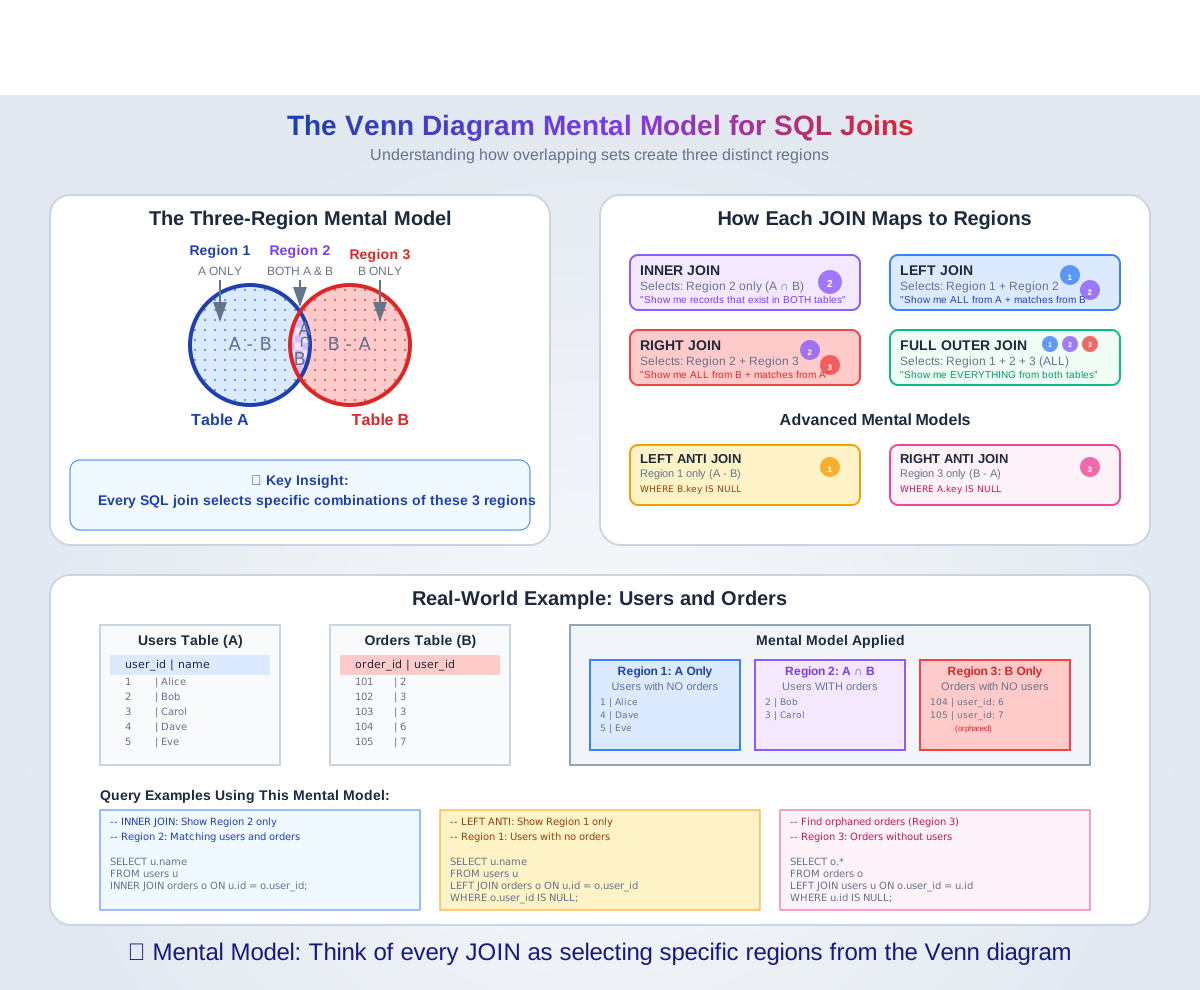
Think of database tables as sets in mathematics. Each row represents an element in the set, and joins are operations that combine these sets based on specific conditions.
The Venn Diagram Mental Model

The Foundation: Sample Data
Let's establish our sample datasets to demonstrate each join type:
-- Customers Table (Table A)
CREATE TABLE customers (
    customer_id INT PRIMARY KEY,
    name VARCHAR(100),
    email VARCHAR(100),
    city VARCHAR(50)
);

INSERT INTO customers VALUES
(1, 'Alice Johnson', 'alice@email.com', 'New York'),
(2, 'Bob Smith', 'bob@email.com', 'Los Angeles'),
(3, 'Carol Davis', 'carol@email.com', 'Chicago'),
(4, 'David Wilson', 'david@email.com', 'Houston'),
(5, 'Eve Brown', 'eve@email.com', 'Phoenix');

-- Orders Table (Table B)
CREATE TABLE orders (
    order_id INT PRIMARY KEY,
    customer_id INT,
    product VARCHAR(100),
    amount DECIMAL(10,2),
    order_date DATE
);

INSERT INTO orders VALUES
(101, 1, 'Laptop', 999.99, '2024-01-15'),
(102, 1, 'Mouse', 29.99, '2024-01-16'),
(103, 2, 'Keyboard', 79.99, '2024-01-17'),
(104, 3, 'Monitor', 299.99, '2024-01-18'),
(105, 6, 'Tablet', 399.99, '2024-01-19'),  -- Customer 6 doesn't exist
(106, 7, 'Phone', 699.99, '2024-01-20');   -- Customer 7 doesn't exist
INNER JOIN: The Intersection
Set Theory: A ∩ B (intersection) Result: Only records where the join condition is true in both tables
SELECT
    c.customer_id,
    c.name,
    c.city,
    o.order_id,
    o.product,
    o.amount
FROM customers c
INNER JOIN orders o ON c.customer_id = o.customer_id;
Output:
Annotated code table
This article originally embedded an interactive annotated code table. The component has not been ported to this version of the site yet — the explanation below stands on its own in the meantime.
Key Insights:
- Only customers who have placed orders appear
- Orders with non-existent customers (6, 7) are excluded
- Customers without orders (David, Eve) are excluded
LEFT JOIN: Preserving the Left Set
Set Theory: A ∪ (A ∩ B) = All of A plus matching B Result: All records from the left table + matching records from the right table
SELECT
    c.customer_id,
    c.name,
    c.city,
    o.order_id,
    o.product,
    o.amount
FROM customers c
LEFT JOIN orders o ON c.customer_id = o.customer_id;
Output:
Annotated code table
This article originally embedded an interactive annotated code table. The component has not been ported to this version of the site yet — the explanation below stands on its own in the meantime.
Key Insights:
- All customers appear in the result
- Customers without orders show NULL for order columns
- Perfect for "show all customers and their orders (if any)"
RIGHT JOIN: Preserving the Right Set
Set Theory: (A ∩ B) ∪ B = All of B plus matching A Result: All records from the right table + matching records from the left table
SELECT
    c.customer_id,
    c.name,
    c.city,
    o.order_id,
    o.product,
    o.amount
FROM customers c
RIGHT JOIN orders o ON c.customer_id = o.customer_id;
Output:
Annotated code table
This article originally embedded an interactive annotated code table. The component has not been ported to this version of the site yet — the explanation below stands on its own in the meantime.
Key Insights:
- All orders appear in the result
- Orders with non-existent customers show NULL for customer columns
- Useful for data quality checks (orphaned records)
FULL OUTER JOIN: The Complete Union
Set Theory: A ∪ B (union) Result: All records from both tables, with NULLs where no match exists
SELECT
    c.customer_id,
    c.name,
    c.city,
    o.order_id,
    o.product,
    o.amount
FROM customers c
FULL OUTER JOIN orders o ON c.customer_id = o.customer_id;
Output:
Annotated code table
This article originally embedded an interactive annotated code table. The component has not been ported to this version of the site yet — the explanation below stands on its own in the meantime.
Key Insights:
- Complete picture of all data
- Shows customers without orders AND orders without customers
- Perfect for comprehensive data analysis and quality checks
CROSS JOIN: The Cartesian Product
Set Theory: A × B (Cartesian product) Result: Every row from table A paired with every row from table B
SELECT
    c.name,
    o.product
FROM customers c
CROSS JOIN orders o
LIMIT 10;  -- Limiting output for readability
Output (partial):
Annotated code table
This article originally embedded an interactive annotated code table. The component has not been ported to this version of the site yet — the explanation below stands on its own in the meantime.
Key Insights:
- Produces 5 customers × 6 orders = 30 total rows
- Use sparingly - can create massive result sets
- Useful for generating combinations or test data
Set Operations: UNION, INTERSECT, EXCEPT
Beyond joins, SQL provides set operations that work on entire result sets:
UNION: Combining Results
-- All customer cities and order locations
SELECT city AS location FROM customers
UNION
SELECT 'Order Processing Center' AS location FROM orders
WHERE order_id = 101;
UNION ALL: Including Duplicates
-- All locations with duplicates
SELECT city FROM customers
UNION ALL
SELECT city FROM customers WHERE customer_id <= 2;
INTERSECT: Common Elements
-- Customers who are also in a separate VIP list
SELECT customer_id FROM customers
INTERSECT
SELECT customer_id FROM vip_customers;
EXCEPT (or MINUS): Set Difference
-- Customers who haven't placed orders
SELECT customer_id FROM customers
EXCEPT
SELECT DISTINCT customer_id FROM orders;
Advanced Join Patterns
Self-Join: Hierarchical Data
-- Employee-Manager relationships
SELECT
    e.name AS employee,
    m.name AS manager
FROM employees e
LEFT JOIN employees m ON e.manager_id = m.employee_id;
Multiple Table Joins
-- Customers, Orders, and Order Items
SELECT
    c.name,
    o.order_id,
    oi.product_name,
    oi.quantity
FROM customers c
INNER JOIN orders o ON c.customer_id = o.customer_id
INNER JOIN order_items oi ON o.order_id = oi.order_id;
Conditional Joins
-- Join with additional conditions
SELECT
    c.name,
    o.order_id,
    o.amount
FROM customers c
LEFT JOIN orders o ON c.customer_id = o.customer_id
    AND o.amount > 100;  -- Additional join condition
Performance Considerations
Index Strategy
-- Ensure indexes on join columns
CREATE INDEX idx_orders_customer_id ON orders(customer_id);
CREATE INDEX idx_customers_id ON customers(customer_id);
Join Order Optimization
-- Smaller table first (generally)
SELECT *
FROM small_table s
INNER JOIN large_table l ON s.id = l.small_id;
Filtering Early
-- Filter before joining when possible
SELECT c.name, o.order_id
FROM customers c
INNER JOIN (
    SELECT * FROM orders
    WHERE order_date >= '2024-01-01'
) o ON c.customer_id = o.customer_id;
Real-World Examples
E-commerce Analytics
-- Customer lifetime value analysis
SELECT
    c.customer_id,
    c.name,
    COUNT(o.order_id) AS total_orders,
    COALESCE(SUM(o.amount), 0) AS lifetime_value,
    CASE
        WHEN COUNT(o.order_id) = 0 THEN 'No Orders'
        WHEN COUNT(o.order_id) = 1 THEN 'Single Purchase'
        WHEN COUNT(o.order_id) <= 5 THEN 'Regular Customer'
        ELSE 'VIP Customer'
    END AS customer_segment
FROM customers c
LEFT JOIN orders o ON c.customer_id = o.customer_id
GROUP BY c.customer_id, c.name
ORDER BY lifetime_value DESC;
Data Quality Audit
-- Find orphaned records and missing relationships
SELECT
    'Customers without orders' AS issue_type,
    COUNT(*) AS count
FROM customers c
LEFT JOIN orders o ON c.customer_id = o.customer_id
WHERE o.customer_id IS NULL

UNION ALL

SELECT
    'Orders without customers' AS issue_type,
    COUNT(*) AS count
FROM orders o
LEFT JOIN customers c ON o.customer_id = c.customer_id
WHERE c.customer_id IS NULL;
Key Takeaways
- Think in Sets: Visualize joins as set operations to predict results
- Choose Wisely:
- INNER JOIN for strict relationships
- LEFT JOIN to preserve the primary entity
- FULL OUTER JOIN for comprehensive analysis
- Performance Matters: Index join columns and filter early
- NULL Handling: Understand how each join type handles missing relationships
- Data Quality: Use OUTER JOINs to identify data integrity issues
Next Steps
In our next SQL article, we'll explore:
- Window Functions: Advanced analytics with OVER clauses
- Common Table Expressions (CTEs): Recursive queries and complex logic
- Query Optimization: Execution plans and performance tuning
Understanding joins is fundamental to SQL mastery. Practice with your own datasets and gradually build complexity as you become comfortable with these patterns.
Have questions about SQL joins or want to see specific examples? Feel free to reach out or leave a comment below!